


With the latest update from our team at EDealer, you can put the cost of the vehicle package in the price of the vehicle as a line item! This is a great way to provide full transparency to potential customers, as it allows them to see the elements that make up the final price in more detail. The prices associated with all Manufacturer Options are now visible in the builder and vehicle details, but will only be visible to potential buyers on the vehicle price if you choose to enable it on the pricing segment (Cash, Financing, and Lease Pricing) of your choice.
While currently this setting only allows you to add Packages, we’re also hard at work expanding this feature so that add-ons can also be added as a line item, so keep an eye out for this feature in the near future!
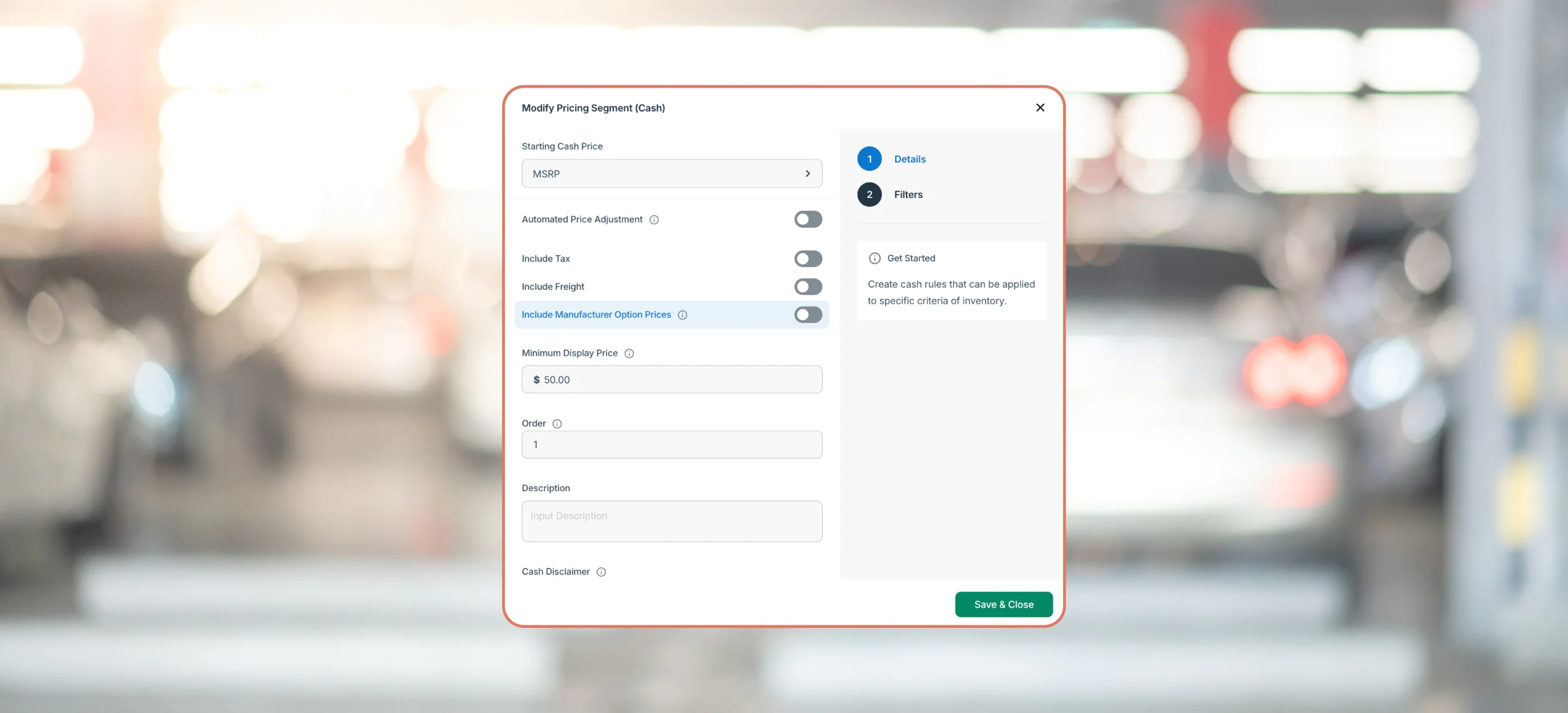
How to Enable Package Fees in Vehicle Pricing
To have the package fees visible as a line item in the vehicle pricing, follow these steps:
- Log in to Evolve.
- Go to Settings > Pricing Segments.
- Navigate to the Segment (Cash, Finance, or Lease Pricing) you want to change .
- Set the “Include Manufacturer Option Prices” toggle to On.
- Click “Save” and close.
Display Package Fees on Your Website Today
For assistance toggling the display of package fees on the Cash, Finance, and Lease Pricing segments on your website, reach out to our EDealer Support Team! You can also click the button below to send us an email, where you can let us know more about which segments you’d like to display the fees on.
